Roblox shirt template maker
A free Roblox shirt template maker that runs entirely in your browser. Start from the official 585 × 559 classic clothing template, colour or upload artwork onto every face, and export an upload-ready PNG — nothing is sent to a server.
Click a face on the template to select it.
Torso
Right arm
Left arm
Free, no signup, no watermark. Designing here costs nothing — Roblox charges its own upload fee when you publish.
What this Roblox clothing template maker does
This is a free Roblox clothing template editor for classic shirts and classic pants. The canvas is exactly 585 × 559 pixels — the size Roblox requires — split into the 18 faces Roblox folds around your avatar: torso front, back, left, right, top and bottom, plus six faces for each arm, or each leg on the pants template.
How to use it. Pick Shirt or Pants, choose a base colour, then drop in an image and choose whether it lands on the front, on front and back, or on every face. Click any face on the template to edit that one on its own. Press Download PNG and you get a 585 × 559 file ready to upload. If you would rather draw in Photoshop or GIMP, Download blank template gives you the same guide grid as a transparent PNG.
The limits. Designing here is free and unlimited. Publishing is not ours to give away: Roblox charges an upload fee of 80 Robux per submission when you publish a Classic Shirt or Classic Pants to the Marketplace. Your images never leave your device — the whole editor is client-side.
Roblox shirt template size and layout
Every rectangle below is measured from Roblox’s own template files. Keep the canvas at 585 × 559 and paint inside these zones and the seams line up on the avatar.
Torso / Hips
| Face | Position | Size |
|---|---|---|
| Top | 231, 8 | 128 × 64 |
| Right side | 165, 74 | 64 × 128 |
| Front | 231, 74 | 128 × 128 |
| Left side | 361, 74 | 64 × 128 |
| Back | 427, 74 | 128 × 128 |
| Bottom | 231, 204 | 128 × 64 |
Right arm / Right leg
| Face | Position | Size |
|---|---|---|
| Top | 217, 289 | 64 × 64 |
| Left side | 19, 355 | 64 × 128 |
| Back | 85, 355 | 64 × 128 |
| Right side | 151, 355 | 64 × 128 |
| Front | 217, 355 | 64 × 128 |
| Bottom | 217, 485 | 64 × 64 |
Left arm / Left leg
| Face | Position | Size |
|---|---|---|
| Top | 308, 289 | 64 × 64 |
| Front | 308, 355 | 64 × 128 |
| Left side | 374, 355 | 64 × 128 |
| Back | 440, 355 | 64 × 128 |
| Right side | 506, 355 | 64 × 128 |
| Bottom | 308, 485 | 64 × 64 |
Positions are top-left corners in pixels on the 585 × 559 canvas. Shirts and pants share an identical unwrap — only the two side groups differ (arms on a shirt, legs on pants).
Sources. Template-Shirts-R15.png, the shirt template inside Roblox’s own Classic-Clothing-Templates.zip, opens at exactly 585 × 559 pixels — that is where this canvas size comes from, not from a blog. The 80 Robux upload fee and the 128 × 128, 64 × 128, 128 × 64 and 64 × 64 face sizes are stated in Roblox’s Classic Clothing documentation. Both re-checked 2026-10-01.
What “Download PNG” actually gives you
On 2026-10-01 we dropped a plain test logo onto the front and back, left the guides on, selected the left arm’s front face so its orange frame was showing, and pressed Download PNG. Then we switched the guides off and downloaded again.
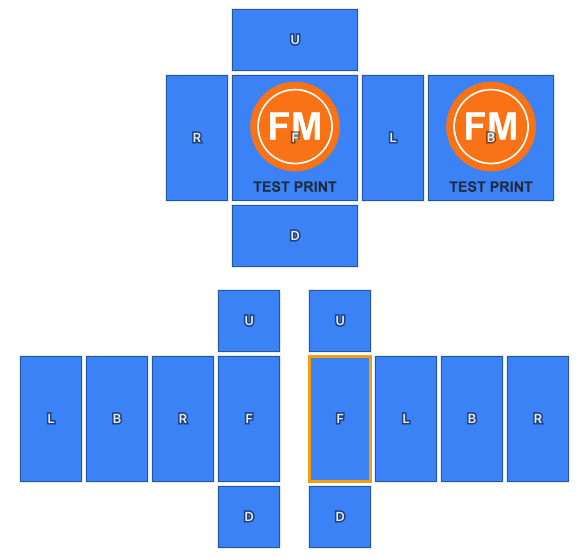
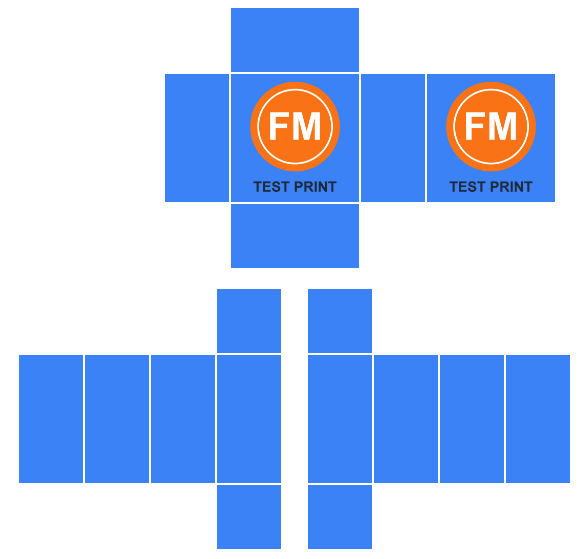
- Size
- 585 × 559 px PNG (RGBA), the same pixel size as Template-Shirts-R15.png in Roblox’s template zip, which we re-opened on 2026-10-01.
- Transparency
- The 18 faces are fully opaque; every pixel outside them is fully transparent.
- Guides
- Not in the file. The download with guides on and a face selected is byte-for-byte identical to the one with guides off (same SHA-256), and each of the 16 faces we left empty is the base colour #3b82f6 on every pixel: no outlines, letters or selection frame.
- File size
- 17.8 KB with our test logo on the front and back.
- Shirt or pants
- Switching to Pants and downloading the same artwork gave the identical file. Only the labels in the editor change.
What it can’t do
- An image fills each face edge to edge, centred and cropped to the face’s shape. You can’t move or resize it inside a face, so crop your art first if the framing matters.
- No 3D preview. Check the PNG on an avatar in Roblox Studio before you pay the upload fee.
- It makes Classic Shirt and Classic Pants templates only. A Roblox classic T-shirt is a different item, one square image (Roblox’s example is 512 × 512 px) shown on the front of the torso, and this editor doesn’t make it.
Where the file goes: Roblox Creator Dashboard
Roblox’s classic clothing docs ask for a .png or .jpg and route uploads through Creator Dashboard → Avatar Items → Classics, where you set the asset type to Shirt or Pants; publishing costs 80 Robux per submission. Source: Roblox Creator Hub, “Classic clothing”, checked 2026-10-01.
How to make and upload a Roblox shirt
- 01
Design the template
Pick Shirt or Pants, set a base colour, then drop in artwork. Click any face to colour or replace it on its own.
- 02
Export at 585 × 559
Hit Download PNG. The guide overlay is drawn on a separate layer, so it is never baked into the file you download.
- 03
Upload to Roblox
Open the Creator Dashboard → Avatar Items → Classics, drop in your PNG (or use Upload Asset), set Asset Type to Shirt or Pants, add a name and description, then click Upload.
- 04
Pay the upload fee
Roblox charges 80 Robux per submission to publish a classic clothing item to the Marketplace. Preview it on an avatar in Roblox Studio first if you want to check the seams before paying.
Roblox shirt template FAQ
- What size is a Roblox shirt template?
- A classic Roblox shirt template is 585 × 559 pixels. Roblox pants use the same 585 × 559 canvas and the same layout. If your file is any other size Roblox stretches it to fit, which pushes every panel off its zone, so export at exactly 585 × 559.
- Is this Roblox clothing template maker free?
- Yes. Designing, editing and downloading are free and unlimited, with no signup, no watermark and no account. The only cost in the whole process is Roblox’s own upload fee, which it charges when you publish a finished item to the Marketplace.
- How much does it cost to upload a shirt to Roblox?
- Roblox charges an upload fee of 80 Robux per submission when you publish a Classic Shirt or Classic Pants to the Marketplace. That fee goes to Roblox, not to this site — everything on this page is free.
- Do my images get uploaded anywhere?
- No. The editor runs entirely in your browser using a canvas — your artwork is never sent to a server, and the PNG is generated on your own device.
- Why does the template look like scattered rectangles?
- It is a box unwrap. Roblox folds those flat rectangles around your avatar’s torso and arms, so the big 128 × 128 square becomes the chest, the 64 × 128 strips become the sides, and the small squares cap the top and bottom. Painting inside the marked faces is what keeps the seams lining up.
- Can I use this for Roblox pants too?
- Yes. Switch the template to Pants, or open the Roblox pants template maker, which is this same editor with Pants already selected and the leg panels labelled. The geometry is identical either way — Roblox uses the same 585 × 559 unwrap — but the two side groups wrap the legs instead of the arms.
- Do I need Photoshop?
- No. You can colour faces and drop in artwork right on this page. If you would rather draw in Photoshop, GIMP or Procreate, use “Download blank template” to get the 585 × 559 guide grid as a transparent PNG and paint over it there.