Free T-Shirt Mockup Generator
Drop in your design and see it on a real tee in seconds — free 1x PNG, no watermark, no signup.
Upload a design or try a sample to see your mockup.
Free 1200px PNG · no watermark · no signup. Your design never leaves your browser.
Finished checkout? We emailed your unlock code. Get your code
What is this mockup for?
HD exports — 2048px
Free downloads are 1200px on the long edge — below the 2000px Etsy recommends and the 2048 × 2048 Shopify recommends for product photos. HD unlocks the full 2048px master every template is built at.
- 2048px PNG, sized for Etsy and Shopify listings — single downloads and batch .zip
- Every category, all 171 templates
- One-time payment, no account, no subscription
- Your code works in any browser, forever
A crop of your current mockup. The free file has 1200px on the long edge (59% of HD per side), so it is softer when zoomed, printed, or shown above ~1200px; on a phone screen or a 1080px social post the two look the same.
$4.90 one-time
The free 1200px export stays free — no watermark, no signup.
Lost your code? Look it up
HD on
HD is unlocked on this browser.
HD 2048px PNG · no watermark · no signup. Your design never leaves your browser.
These tee mockups use photoreal blanks generated in-house for this tool, not photographs of a particular supplier's shirt. Upload your design, switch colors, and export a clean PNG — all in your browser.
From design to mockup in three steps
Upload your design
Drop in a PNG, JPG, WebP or SVG. It loads straight into your browser — nothing is sent to a server.
Pick a shirt
Choose a color and your artwork is warped onto the tee with the right perspective in real time.
Download free
Export a clean 1x PNG with no watermark and no signup. Switch colors and re-download as many as you like.
Sized for where you sell
The free export is a clean 1200px PNG. For exact listing-image dimensions per marketplace, use the platform presets and size guides — each one is verified against the platform’s own documentation before it ships.
Pick a tee starting point
The tee is the reference product — everything else is a compromise on it
A t-shirt gives you the biggest uninterrupted apparel area in this tool and the most forgiving surface. That's why it's where most designs should be tested first.
Two layouts, two different sells
The tees here come as flat lays and as hanging shots. Flat lays read as catalogue product photos and show the print squarely; hanging shots show drape and fall, which is what makes a garment look wearable rather than like a sheet of fabric. Listings that use both usually convert better than listings that use either alone.
Heather is not a flat colour
Heather grey is a blend of fibres, so it reads as a texture rather than a solid. Fine linework and pale ink sit differently on it than on a solid tee, and a design tested only on black and white can look muddier than expected once it lands on heather.
Dark garments need a white underbase
Printing colour onto black, navy or forest cotton requires a white layer down first, or the ink goes transparent. That underbase adds a slightly stiffer hand to the printed patch and can leave a faint halo if registration drifts — which is why one-colour white designs are the safest thing to put on a dark tee.
Design size
- Print area
- 552 × 620 px
- Aspect ratio
- 1 : 1.12(taller than wide)
- Base image
- 2048 × 2048 px
Your design is scaled to fit and centred — never stretched. A canvas at 1 : 1.12 fills this print area edge to edge.
What the free export actually is
On 2026-10-01 we ran this tool on our own build with a plain test design we made ourselves, downloaded the free PNG and the batch zip, and measured every file. The images below are those downloads, reduced for this page.
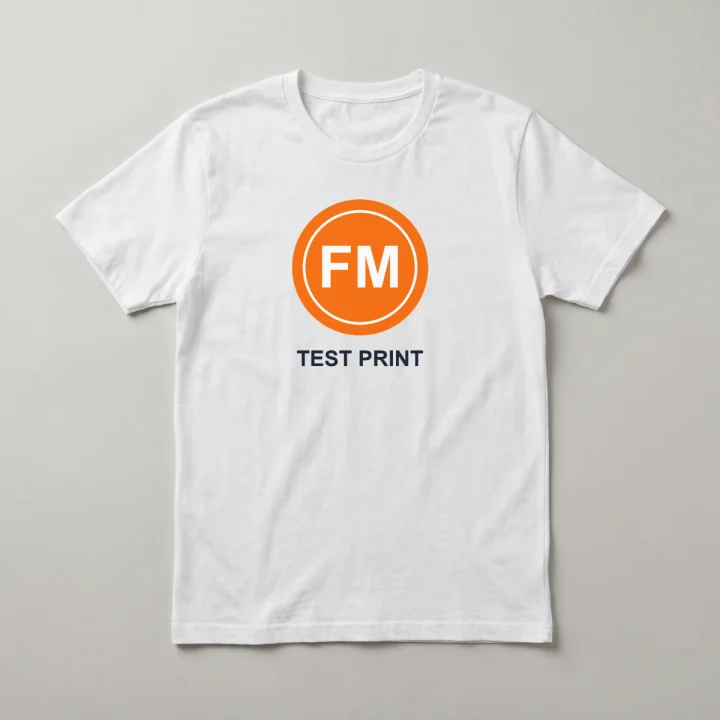
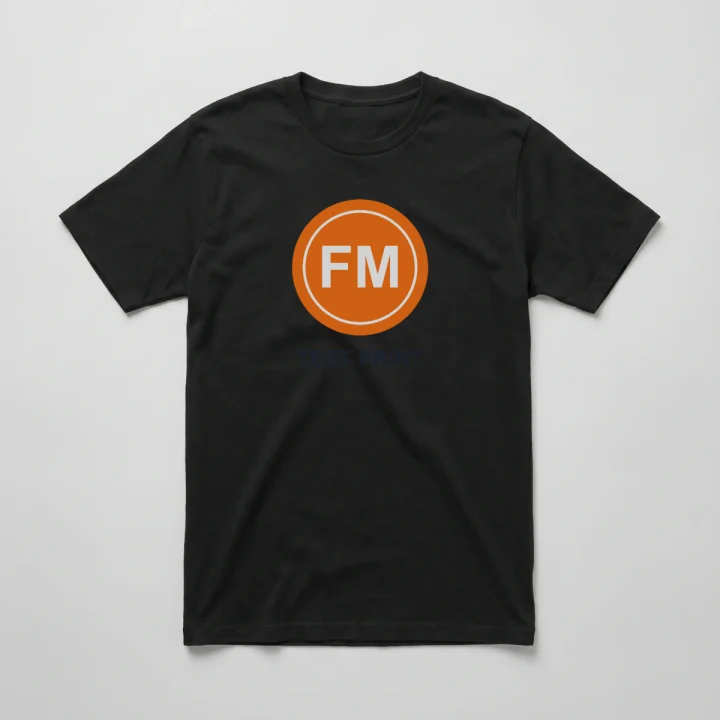
- Format
- PNG (RGBA), one file per template
- Pixel size
- 1200 × 1200 px on all 12 templates
- Background
- Opaque: alpha is 255 on every pixel, so the photo backdrop is part of the file. There is no transparent cut-out.
- File size
- 0.74–2.00 MB per PNG with our test design
- Batch zip
- t-shirt-mockups.zip: 12 PNGs, 14.5 MB, stored without compression
What it can’t do
- One print area per template: the chest. None of the 12 shirts has a back, sleeve or neck-label position.
- The design is laid on flat. It does not bend into the folds; they show through only because 20% of the photo’s shading is multiplied on top.
- No white underbase is simulated, so dark ink stays dark on a dark shirt, as the black tee above shows.
- Nothing trims the design to the shirt. Enlarged past the print box (the handle goes up to 4×), it runs off the tee onto the backdrop. We tried it.
Where the file goes: Etsy listing photo
Etsy accepts PNG and says the transparent parts of a PNG appear black; these files have no transparent pixels, so nothing turns black. 1200 px clears the 635 px Etsy asks of a first listing photo but is below the 2,000 px it recommends, and Etsy warns that images over 1 MB may not finish uploading. Our tee PNGs were 0.74–2.00 MB, so re-save as JPG if an upload stalls. Source: Etsy Help, “Requirements and Best Practices for Images in Your Etsy Shop”, checked 2026-10-01.
T-shirt mockup FAQ
Is the t-shirt mockup generator free?
Yes. You can upload a design and download a clean 1x PNG for free — no watermark, no account, and no email wall. Batch .zip export is free too, and the commercial-use licence covers every export. The only optional extra is a one-time HD unlock for 2048px.
Can I use these mockups commercially?
Yes. The mockups you create are yours to use in your own product listings on Etsy, Shopify, Printful, Printify and other shops. The blank templates are provided for commercial product mockups — see our image license for the full terms.
What resolution is the free download, and how do I get higher resolution?
The free export is a clean 1200px PNG (1x) with no watermark. Batch .zip export is free as well. If you want the full 2048px master, HD is a one-time unlock — no account, no subscription, nothing recurring.
Does my design get uploaded anywhere?
No. Your artwork is composited entirely in your browser using canvas — it never leaves your device. Load the page, switch off your network, and uploading, previewing and downloading all still work.
Can I preview my design on different shirt colors and angles?
Yes. Pick a color swatch to re-render your design on that shirt instantly. More colors, back views and folded angles are added as new templates ship.